
Windows系统下小巧MySQL数据库备份工具“Mysql一键shell脚本之部署简易版”

[重要通告]如您遇疑难杂症,本站支持知识付费业务,扫右边二维码加博主微信,可节省您宝贵时间哦!
Windows系统下MySQL数据库备份工具有很多,甚至命令都可以做备份,这里就不做一一介绍,今儿单纯想记录这一个Windows系统下小巧MySQL数据库备份工具;
Windows系统下小巧MySQL数据库备份工具
MySQL数据库备份工具,利用了Mysql里的mysqldump.exe。
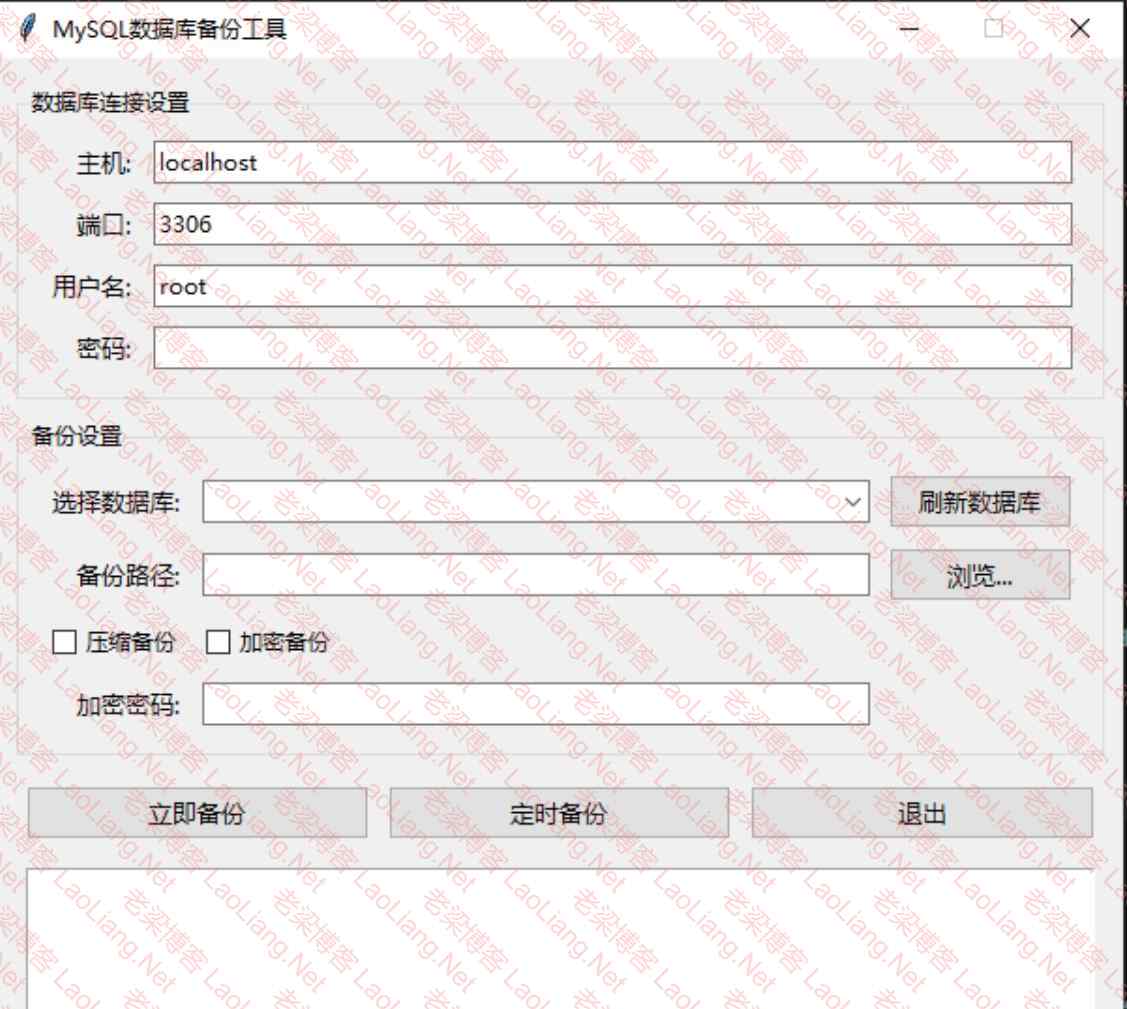
功能:
1. 连接MySQL数据库
2. 执行全库备份
3. 可选择备份指定表
4. 支持定时备份
5. 支持压缩备份
Windows系统下小巧MySQL数据库备份工具下载地址:
Mysql一键shell脚本之部署简易版
一个shell脚本 基于虚拟机环境下,进行mysql数据库的一键安装脚本,环境准备:vmware15.0.4,centos7.9,mysql8.0.31
正确食用方法:新建一个文件 mysql8.sh,扩展名为 sh(sh代表shell),省下就不用说了吧!
#!/bin/bash/

#定义变量
mysql="ps -ef | grep mysql | grep -v grep | wc -l "
mysqlPID=" ps -ef | grep mysql | grep -v grep | awk '{print $2}' "
#查询检测mysql是否运行,如运行则杀掉进程
if [ "$mysql" = 0 ]; then
echo "设备上未运行mysql数据库"
fi

if [ "$mysql" = 1 ]; then
kill -9 $mysqlPID
fi
##### #删除旧版mysql包
rpm -qa | grep mariadb|xargs rpm -e --nodeps >/dev/null 2>&1
rm -rf /usr/bin/mysql
rm -rf /usr/local/mysql
rm -rf /usr/lib/systemd/system/mysql*

#此区域需要根据实际情况进行修改

Path=/test
#指定mysql压缩包解压的目录,与PathNAME1相呼应

PathNAME=/test/mysql-8.0.31-el7-x86_64.tar.gz
#此路径为mysql tar包路径

PathNAME1=/test/mysql-8.0.31-el7-x86_64
#此路径为解压完成的路径

#删除mysql用户和组
userdel -r mysql >/dev/null 2>&1
groupdel mysql >/dev/null 2>&1

groupadd mysql >/dev/null 2>&1
#解压mysql安装包
tar -zxf $PathNAME -C $Path

#将解压的安装包移动到安装目录
mv $PathNAME1 /usr/local/mysql
mkdir /usr/local/mysql/data

#创建mysql用户
useradd -r -g mysql -s /bin/false mysql > /dev/null 2>&1

#安装目录设置为mysql用户和组所有
chown -R mysql:mysql /usr/local/mysql > /dev/null 2>&1

#写入配置文件
echo '[mysqld]
##### # 设置3306端口
port=3306
##### # 设置mysql的安装目录
basedir=/usr/local/mysql
##### # 设置mysql数据库的数据的存放目录
datadir=/usr/local/mysql/data

sql_mode=STRICT_TRANS_TABLES,NO_ZERO_IN_DATE,NO_ZERO_DATE,ERROR_FOR_DIVISION_BY_ZERO,NO_ENGINE_SUBSTITUTION
lower_case_table_names=1
##### # 允许最大连接数
max_connections=10000
##### # 允许连接失败的次数。这是为了防止有人从该主机试图攻击数据库系统
max_connect_errors=10
##### # 服务端使用的字符集默认为UTF8
character-set-server=UTF8MB4
##### # 创建新表时将使用的默认存储引擎
default-storage-engine=INNODB
##### # 默认使用“mysql_native_password”插件认证
default_authentication_plugin=mysql_native_password
[mysql]
##### # 设置mysql客户端默认字符集
default-character-set=UTF8MB4
[client]
##### #设置mysql客户端连接服务端时默认使用的端口
port=3306
default-character-set=UTF8MB4' > /etc/my.cnf

#初始化mysql,需记住初始密码
cd /usr/local/mysql/
./bin/mysqld --initialize --console &>passwd.txt
tem_passwd=$(cat /usr/local/mysql/passwd.txt |grep "temporary"|awk '{print $NF}')
chown -R mysql:mysql /usr/local/mysql
echo "初始密码为:'$tem_passwd'"
echo '初始密码已保存至/root/password.txt中'
echo "$tem_passwd" > /root/password.txt

#将mysql加入系统服务,及使用systemctl管理
echo '[Unit]
Description=MySQL Server
Documentation=man:mysqld(8)
Documentation=http://dev.mysql.com/doc/refman/en/using-systemd.html
After=network.target
After=syslog.target

[Install]
WantedBy=multi-user.target

[Service]
User=mysql
Group=mysql

PIDFile=/usr/local/mysql/data/mysqld.pid

# Disable service start and stop timeout logic of systemd for mysqld service.
TimeoutSec=0 #systemd的service超时时间设定 0为不限制

# Execute pre and post scripts as root
PermissionsStartOnly=true #以root权限来启动程序
# Needed to create system tables
#ExecStartPre=/usr/bin/mysqld_pre_systemd

# Start main service
ExecStart=/usr/local/mysql/bin/mysqld --daemonize --pid-file=/usr/local/mysql/data/mysqld.pid
#注意这里要加上 --daemonize 使进程后台运行

# Use this to switch malloc implementation
#EnvironmentFile=-/etc/sysconfig/mysql

# Sets open_files_limit
LimitNOFILE = 5000

Restart=on-failure
# 故障时重启
RestartPreventExitStatus=1

PrivateTmp=false' > /usr/lib/systemd/system/mysqld.service
#重定向到系统服务目录内

systemctl daemon-reload
#刷新系统服务
systemctl enable mysqld.service --now
#设置mysql开机自启

#设置软连接,可直接命令行mysql进入服务
ln -s /usr/local/mysql/bin/mysql /usr/bin/mysql
#停止正在运行的mysql,重新启动。
systemctl restart mysqld.service
下面这部分就需要手动去完成
#输入mysql -u用户名 -p密码 进入mysql数据库中
mysql -uroot -p'hlafnHntA9(b'

#修改mysql默认的root密码
alter user 'root'@'localhost' identified by 'Zz123456';
#添加远程访问用户
CREATE USER 'root'@'%'IDENTIFIED BY 'Zz123456';
grant all privileges on *.* to 'root'@'%' with grant option;
flush privileges;
#使用修改后的mysql进入数据库
mysql -uroot -p'Zz123456'
Windows系统下小巧MySQL数据库备份工具源码
#!/usr/bin/env python
# -*- coding: utf-8 -*-

"""
MySQL数据库备份工具
功能:
1. 连接MySQL数据库
2. 执行全库备份
3. 可选择备份指定表
4. 支持定时备份
5. 支持压缩备份
"""
import subprocess
import pymysql
import datetime
import os
import gzip
import tkinter as tk
from tkinter import ttk, messagebox, filedialog
import threading
import schedule
import time
from Crypto.Cipher import AES
from Crypto.Util.Padding import pad, unpad
import base64
import hashlib
import logging
from logging.handlers import RotatingFileHandler

class MySQLBackupApp:
"""MySQL数据库备份工具主界面"""

def __init__(self, root):
self.root = root
self.root.title("MySQL数据库备份工具")
self.root.geometry("600x700")
self.root.resizable(False, False)

# 日志文件路径
self.log_file = os.path.join(os.path.dirname(os.path.abspath(__file__)), 'log', datetime.datetime.now().strftime('%Y-%m-%d %H_%M_%S') + '.log')

# 设置样式
self.style = ttk.Style()
self.style.configure('TFrame', background='#f0f0f0')
self.style.configure('TLabel', background='#f0f0f0', font=('微软雅黑', 10))
self.style.configure('TButton', font=('微软雅黑', 10))
self.style.configure('TEntry', font=('微软雅黑', 10))

self.create_widgets()

def create_widgets(self):
"""创建界面控件"""
main_frame = ttk.Frame(self.root, padding="10 10 10 10")
main_frame.pack(fill=tk.BOTH, expand=True)

# 连接设置
conn_frame = ttk.LabelFrame(main_frame, text="数据库连接设置", padding="10 5 10 10")
conn_frame.pack(fill=tk.X, pady=5)

# 使用统一的列宽和间距
conn_frame.columnconfigure(1, weight=1, minsize=200)

ttk.Label(conn_frame, text="主机:").grid(row=0, column=0, sticky=tk.E, padx=5, pady=5)
self.host_entry = ttk.Entry(conn_frame)
self.host_entry.grid(row=0, column=1, sticky=tk.EW, padx=5, pady=5)
self.host_entry.insert(0, "localhost")

ttk.Label(conn_frame, text="端口:").grid(row=1, column=0, sticky=tk.E, padx=5, pady=5)
self.port_entry = ttk.Entry(conn_frame)
self.port_entry.grid(row=1, column=1, sticky=tk.EW, padx=5, pady=5)
self.port_entry.insert(0, "3306")

ttk.Label(conn_frame, text="用户名:").grid(row=2, column=0, sticky=tk.E, padx=5, pady=5)
self.user_entry = ttk.Entry(conn_frame)
self.user_entry.grid(row=2, column=1, sticky=tk.EW, padx=5, pady=5)
self.user_entry.insert(0, "root")

ttk.Label(conn_frame, text="密码:").grid(row=3, column=0, sticky=tk.E, padx=5, pady=5)
self.pass_entry = ttk.Entry(conn_frame, show="*")
self.pass_entry.grid(row=3, column=1, sticky=tk.EW, padx=5, pady=5)

# 备份设置
backup_frame = ttk.LabelFrame(main_frame, text="备份设置", padding="10 5 10 10")
backup_frame.pack(fill=tk.X, pady=5)

# 使用统一的列宽和间距
backup_frame.columnconfigure(1, weight=1, minsize=200)

# 数据库选择下拉菜单
ttk.Label(backup_frame, text="选择数据库:").grid(row=0, column=0, sticky=tk.E, padx=5, pady=5)
self.db_combobox = ttk.Combobox(backup_frame, state="readonly")
self.db_combobox.grid(row=0, column=1, sticky=tk.EW, padx=5, pady=5)

# 刷新数据库按钮
self.refresh_btn = ttk.Button(backup_frame, text="刷新数据库", command=self.refresh_databases)
self.refresh_btn.grid(row=0, column=2, sticky=tk.E, padx=5, pady=5)

ttk.Label(backup_frame, text="备份路径:").grid(row=1, column=0, sticky=tk.E, padx=5, pady=5)
self.path_entry = ttk.Entry(backup_frame)
self.path_entry.grid(row=1, column=1, sticky=tk.EW, padx=5, pady=5)

self.browse_btn = ttk.Button(backup_frame, text="浏览...", command=self.browse_path)
self.browse_btn.grid(row=1, column=2, sticky=tk.E, padx=5, pady=5)

# 压缩和加密选项放在同一行
self.compress_var = tk.IntVar(value=0)
self.compress_cb = ttk.Checkbutton(backup_frame, text="压缩备份", variable=self.compress_var)
self.compress_cb.grid(row=2, column=0, sticky=tk.W, padx=5, pady=5)

self.encrypt_var = tk.IntVar(value=0)
self.encrypt_cb = ttk.Checkbutton(backup_frame, text="加密备份", variable=self.encrypt_var)
self.encrypt_cb.grid(row=2, column=1, sticky=tk.W, padx=5, pady=5)

self.password_entry = ttk.Entry(backup_frame, show="*")
self.password_entry.grid(row=4, column=1, sticky=tk.EW, padx=5, pady=5)
ttk.Label(backup_frame, text="加密密码:").grid(row=4, column=0, sticky=tk.E, padx=5, pady=5)

# 操作按钮
btn_frame = ttk.Frame(main_frame)
btn_frame.pack(fill=tk.X, pady=10)

# 使用统一的按钮宽度
btn_frame.columnconfigure(0, weight=1)
btn_frame.columnconfigure(1, weight=1)
btn_frame.columnconfigure(2, weight=1)

self.backup_btn = ttk.Button(btn_frame, text="立即备份", command=self.start_backup)
self.backup_btn.grid(row=0, column=0, padx=5, sticky=tk.EW)

self.schedule_btn = ttk.Button(btn_frame, text="定时备份", command=self.set_schedule)
self.schedule_btn.grid(row=0, column=1, padx=5, sticky=tk.EW)

self.exit_btn = ttk.Button(btn_frame, text="退出", command=self.root.quit)
self.exit_btn.grid(row=0, column=2, padx=5, sticky=tk.EW)

# 日志输出
self.log_text = tk.Text(main_frame, height=8, wrap=tk.WORD)
self.log_text.pack(fill=tk.BOTH, expand=True, padx=5, pady=5)

# 状态栏
self.status_var = tk.StringVar()
self.status_var.set("准备就绪")

status_bar = ttk.Label(main_frame, textvariable=self.status_var, relief=tk.SUNKEN)
status_bar.pack(fill=tk.X)

# 初始化日志系统
self.setup_logging()

def setup_logging(self):
"""初始化日志系统"""
# 创建日志记录器
self.logger = logging.getLogger('MySQLBackup')
self.logger.setLevel(logging.INFO)

# 创建文件处理器,设置日志轮转(每个文件10MB,保留5个备份)
file_handler = RotatingFileHandler(
self.log_file, maxBytes=10*1024*1024, backupCount=5, encoding='utf-8')

# 创建控制台处理器
console_handler = logging.StreamHandler()

# 设置日志格式
formatter = logging.Formatter(
'%(asctime)s - %(levelname)s - %(message)s',
datefmt='%Y-%m-%d %H:%M:%S')
file_handler.setFormatter(formatter)
console_handler.setFormatter(formatter)

# 添加处理器
self.logger.addHandler(file_handler)
self.logger.addHandler(console_handler)

# 记录初始化完成
self.logger.info('日志系统初始化完成')

def log_operation(self, operation, status, details=None, start_time=None, end_time=None, backup_size=None):
"""记录操作日志

Args:
operation (str): 操作名称
status (str): 操作状态(成功/失败)
details (str, optional): 操作详情
start_time (str, optional): 备份开始时间
end_time (str, optional): 备份结束时间
backup_size (str, optional): 备份文件大小
"""
log_msg = f"操作: {operation} | 状态: {status}"
if start_time:
log_msg += f" | 开始时间: {start_time}"
if end_time:
log_msg += f" | 结束时间: {end_time}"
if backup_size:
log_msg += f" | 备份大小: {backup_size}"
if details:
log_msg += f" | 详情: {details}"
self.logger.info(log_msg)

def browse_path(self):
"""选择备份路径"""
path = filedialog.askdirectory()
if path:
self.path_entry.delete(0, tk.END)
self.path_entry.insert(0, path)

def set_schedule(self):
"""设置定时备份"""
# 创建定时设置窗口
schedule_win = tk.Toplevel(self.root)
schedule_win.title("定时备份设置")
schedule_win.geometry("300x200")

# 定时设置控件
ttk.Label(schedule_win, text="每天备份时间:").pack(pady=5)
self.time_entry = ttk.Entry(schedule_win)
self.time_entry.pack(pady=5)
self.time_entry.insert(0, "09:00")

ttk.Label(schedule_win, text="备份间隔(天):").pack(pady=5)
self.interval_entry = ttk.Entry(schedule_win)
self.interval_entry.pack(pady=5)
self.interval_entry.insert(0, "1")

# 保存按钮
save_btn = ttk.Button(schedule_win, text="保存",
command=lambda: self.save_schedule(schedule_win))
save_btn.pack(pady=10)

def save_schedule(self, window):
"""保存定时设置"""
try:
backup_time = self.time_entry.get()
interval = int(self.interval_entry.get())

# 清除现有任务
schedule.clear()

# 添加新任务
schedule.every(interval).days.at(backup_time).do(self.start_backup)

# 启动定时任务线程
threading.Thread(target=self.run_schedule, daemon=True).start()

messagebox.showinfo("成功", f"已设置每天{backup_time}执行备份")
window.destroy()

except Exception as e:
messagebox.showerror("错误", f"设置定时备份失败: {str(e)}")

def run_schedule(self):
"""运行定时任务"""
while True:
schedule.run_pending()
time.sleep(1)

def refresh_databases(self):
"""刷新数据库列表"""
try:
# 获取连接参数
host = self.host_entry.get()
port = int(self.port_entry.get())
user = self.user_entry.get()
password = self.pass_entry.get()

if not all([host, port, user, password]):
messagebox.showerror("错误", "请先填写数据库连接信息!")
return

# 连接数据库
conn = pymysql.connect(
host=host,
port=port,
user=user,
password=password,
charset='utf8mb4'
)

# 获取所有非系统数据库
cursor = conn.cursor()
cursor.execute("SHOW DATABASES")
databases = [db[0] for db in cursor.fetchall()
if db[0] not in ('information_schema', 'performance_schema', 'mysql', 'sys')]

# 更新下拉菜单
self.db_combobox['values'] = databases
if databases:
self.db_combobox.current(0)

# 启用多选模式
self.db_combobox['state'] = 'normal'

conn.close()
messagebox.showinfo("成功", "数据库列表已刷新!")

except Exception as e:
messagebox.showerror("错误", f"连接数据库失败: {str(e)}")

def start_backup(self):
"""开始备份"""
# 验证输入
if not self.path_entry.get():
messagebox.showerror("错误", "请选择备份路径")
return

# 禁用按钮
self.backup_btn.config(state=tk.DISABLED)
self.status_var.set("正在备份...")

# 在新线程中执行备份
backup_thread = threading.Thread(target=self.do_backup)
backup_thread.daemon = True
backup_thread.start()

def do_backup(self):
"""执行备份操作"""
try:
# 获取连接参数
host = self.host_entry.get()
port = int(self.port_entry.get())
user = self.user_entry.get()
password = self.pass_entry.get()
backup_path = self.path_entry.get()
compress = self.compress_var.get()
encrypt = self.encrypt_var.get()
encrypt_password = self.password_entry.get() if encrypt else None

# 连接数据库
conn = pymysql.connect(
host=host,
port=port,
user=user,
password=password,
charset='utf8mb4'
)

# 获取所有数据库
cursor = conn.cursor()
cursor.execute("SHOW DATABASES")
all_databases = [db[0] for db in cursor.fetchall()
if db[0] not in ('information_schema', 'performance_schema', 'mysql', 'sys')]

# 获取要备份的数据库
selected_dbs = self.db_combobox.get().split(',') if self.db_combobox.get() else []
if not selected_dbs:
messagebox.showerror("错误", "请选择要备份的数据库!")
return

databases = [db.strip() for db in selected_dbs if db.strip() in all_databases]

# 记录要备份的数据库
self.logger.info(f"正在备份数据库: {', '.join(databases)}")

# 记录备份开始
self.logger.info(f"开始备份...")
self.logger.info(f"备份目录: {backup_path}")

# 创建备份目录
timestamp = datetime.datetime.now().strftime("%Y%m%d_%H%M%S")
backup_dir = os.path.join(backup_path, f"mysql_backup_{timestamp}")
os.makedirs(backup_dir, exist_ok=True)

self.log("开始备份...")
self.log(f"备份目录: {backup_dir}")

# 备份每个数据库
for db in databases:
self.log(f"正在备份数据库: {db}")

# 生成备份文件名
backup_file = os.path.join(backup_dir, f"{db}.sql")

# 使用mysqldump命令备份(流式处理优化内存)
try:
# 检查mysqldump路径
mysqldump_path = os.path.join(os.path.dirname(__file__), 'bin', 'mysqldump.exe')
if not os.path.exists(mysqldump_path):
raise Exception(f"找不到mysqldump.exe,请确保MySQL客户端工具已安装并在路径: {mysqldump_path}")

# 使用subprocess.Popen进行流式处理
with open(backup_file, 'w') as f_out:
process = subprocess.Popen(
[mysqldump_path, f"-h{host}", f"-P{port}", f"-u{user}", f"-p{password}", "--databases", db, "--quick", "--single-transaction"],
stdout=subprocess.PIPE,
stderr=subprocess.PIPE,
universal_newlines=True,
encoding='utf-8',
errors='replace'
)

# 分批读取数据
while True:
output = process.stdout.readline()
if output == '' and process.poll() is not None:
break
if output:
f_out.write(output)
f_out.flush()

# 检查错误
_, stderr = process.communicate()
if process.returncode != 0:
raise Exception(f"mysqldump失败: {stderr}")
except Exception as e:
self.log(f"备份失败: {str(e)}", error=True)
return

# 如果需要压缩
if compress:
self.log(f"压缩备份文件: {backup_file}")
with open(backup_file, 'rb') as f_in:
with gzip.open(f"{backup_file}.gz", 'wb') as f_out:
f_out.writelines(f_in)
os.remove(backup_file)
if encrypt:
self.log(f"加密备份文件: {backup_file}")
self.encrypt_file(backup_file, encrypt_password)

self.log("备份完成!")
# 记录备份完成
self.logger.info("备份完成!")
self.status_var.set("备份完成")

except Exception as e:
self.log(f"备份失败: {str(e)}", error=True)
self.status_var.set("备份失败")

finally:
if 'conn' in locals() and conn:
conn.close()
self.backup_btn.config(state=tk.NORMAL)

def log(self, message, error=False):
"""记录日志"""
timestamp = datetime.datetime.now().strftime("%Y-%m-%d %H:%M:%S")
log_msg = f"[{timestamp}] {message}\n"

self.log_text.insert(tk.END, log_msg)
self.log_text.see(tk.END)

if error:
self.log_text.tag_add("error", "end-2l", "end-1c")
self.log_text.tag_config("error", foreground="red")

def encrypt_file(self, file_path, password):
"""加密文件"""
# 生成密钥
key = hashlib.sha256(password.encode()).digest()
cipher = AES.new(key, AES.MODE_CBC)

with open(file_path, 'rb') as f:
plaintext = f.read()

# 加密并添加IV
ciphertext = cipher.encrypt(pad(plaintext, AES.block_size))
encrypted = cipher.iv + ciphertext

# 保存加密文件
with open(file_path + '.enc', 'wb') as f:
f.write(encrypted)
os.remove(file_path)

if __name__ == "__main__":
root = tk.Tk()
app = MySQLBackupApp(root)
root.mainloop()
问题未解决?付费解决问题加Q或微信 2589053300 (即Q号又微信号)右上方扫一扫可加博主微信
所写所说,是心之所感,思之所悟,行之所得;文当无敷衍,落笔求简洁。 以所舍,求所获;有所依,方所成!
赏
 支付宝赞助
支付宝赞助  微信赞助
微信赞助
支付宝赞助微信赞助免责声明,若由于商用引起版权纠纷,一切责任均由使用者承担。
您必须遵守我们的协议,如您下载该资源,行为将被视为对《免责声明》全部内容的认可->联系老梁投诉资源 LaoLiang.Net部分资源来自互联网收集,仅供用于学习和交流,请勿用于商业用途。如有侵权、不妥之处,请联系站长并出示版权证明以便删除。
敬请谅解! 侵权删帖/违法举报/投稿等事务联系邮箱:service@laoliang.net
意在交流学习,欢迎赞赏评论,如有谬误,请联系指正;转载请注明出处: » Windows系统下小巧MySQL数据库备份工具“Mysql一键shell脚本之部署简易版”

感谢分享
看看效果怎么样